Revenue: opening and closing a Deal
Learn how to manually create/add a new open Deal, and then close it once the revenue is confirmed
Summary
It's easy to create a new Deal for a new business opportunity
Once you've created the Deal, you add Line Items (Subscriptions/Fees) to it, typically via Products from your Product Catalog
At the end of your sales process, use the system (standard) "Stage" field on the Deal to mark it as "Closed Won" or "Closed Lost"
Who is this article for?
All Planhat Users
This article refers to new revenue features in Planhat, launching in early 2026, so you may not have access to them yet. Please speak with your Planhat CSM if you would like to discuss the rollout.
Introduction
In Planhat, following changes rolled out in early 2026, the main "parent" model for revenue is Deal. Attached to an individual Deal record, you'll likely have one or more "child" Line Items records, which are either Subscriptions (recurring revenue) or Fees (non-recurring revenue).
Deals are used for both potential revenue (opportunities), and revenue that is confirmed as won or lost.
In this article, we'll go through the scenario of manually creating a new Deal record and assigning Line Items to it. We'll also cover how to manually close a Deal.
📚 Further reading
In this specific article we won't cover the process of progressing a Deal along stages in a pipeline in Planhat. For details of that, see our separate article here
We also won't concentrate on creating renewal Deals in this article - to learn about processing renewals in Planhat, see here
In additional to these articles, you can also go through a tutorial on the "New business Deal lifecycle" here
📌 Definitions
"Data models" - also called simply "models" - are the Planhat equivalent of the "objects" you may be familiar with from other tools. Data is organized into these models - we go through some key examples below. Within these models, individual examples of data are called "records"
"Company" is the model for organizations that are your prospects and customers - e.g. Company records could be "Apple" and "Zoom". Company is at the top of the Planhat data model structure
"Deal" is the "parent" revenue model for both potential sales (opportunities), confirmed sales and lost opportunities. Deals can have one or more (or no) Line Items associated with them. Each Deal is associated with a specific Company - e.g. a Deal record could be "Renewal Deal for Gong"
"Line Item" is a "child" model to the Deal model. Each Line Item corresponds to a specific unit of revenue - a "Subscription" (recurring revenue) or a "Fee" (non-recurring revenue). Each Line Item corresponds to a specific Deal, so that means it's (forecasted/actual/lost) revenue for a specific Company. An example Line Item record could be "Advanced Data on Deal with Scribe"
"Product" records act as (optional) templates for Line Items, e.g. "Advanced Data". They are housed in the "Product Catalog" within the "Settings" Global Tool
Creating a new Deal
Let's take a look at the process of a manually creating a new Deal - a new business opportunity. (This is opposed to selecting an existing Deal and creating a renewal Deal from it, which we go over in a separate article here.)
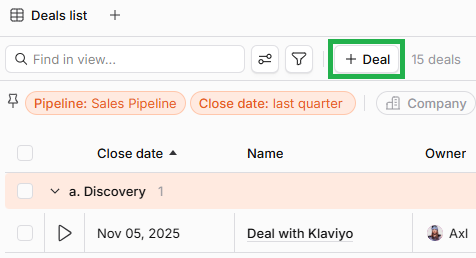
Once your Deal has been set up with its Line Items, you can then carry out your sales process, whether that involves taking the Deal through a pipeline of multiple stages, as we describe in a separate article here, or something more simple where you just progress to marking the Deal as either "Closed Won" or "Closed Lost".
Closing a Deal
When you're ready to mark a Deal as "Closed", you use the system (standard) field "Stage", located in the top-right of each Deal Preview. There are separate default values for "Closed Won" and "Closed Lost".
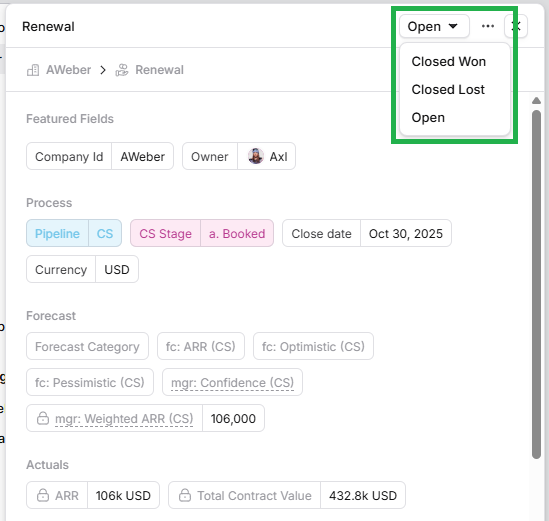
Marking a Deal as "Closed Won" means that the revenue is counted/recognized as confirmed/actual revenue in Planhat, so it's a really crucial process. This affects revenue reporting in System Reports, as well as the revenue shown elsewhere for the Company. You'll notice that when a Deal's Stage is set to "Closed Won", the "Revenue Recognized" system field on its associated Line Item(s) is enabled / set to true.
🚀 Tip
If you are using custom fields for custom pipelines (e.g. "Sales Stage" and "CS Stage" as documented here), you can set up a simple Automation in Planhat that sets the Planhat system "Stage" field to "Closed Won" / "Closed Lost" when custom stage fields are updated to the same values, to ensure that the revenue is correctly recognized in the system. Speak with your TDS if you would like to discuss this further.
📌 Important to note
Deleting a Deal (not recommended) also deletes any attached Line Items.
This is because Line Items can't exist in isolation - only as part of a Deal.