Non-Recurring Revenue - Sales
Record your NRR/Sale data in Planhat and produce reports using that data
Record non-recurring revenue in Planhat using the Sale model, and have those numbers reflected in revenue report Pages, as well as have it affect the overall value of the customer Company in your portfolio.
How to add Sale (NRR) products
📌 Important to note: Sale/NRR can be enabled/disabled in your tenant. If you don't currently have access and would like it to be enabled, please reach out to your CSM and let them know so they can assist you.
With Sale/NRR enabled, you'll be able to add your non-recurring product options. To do this, go to the "Settings" Global Tool > scroll down until you see the title "Product Catalog" > click on "Add non-recurring product" and enter the details.
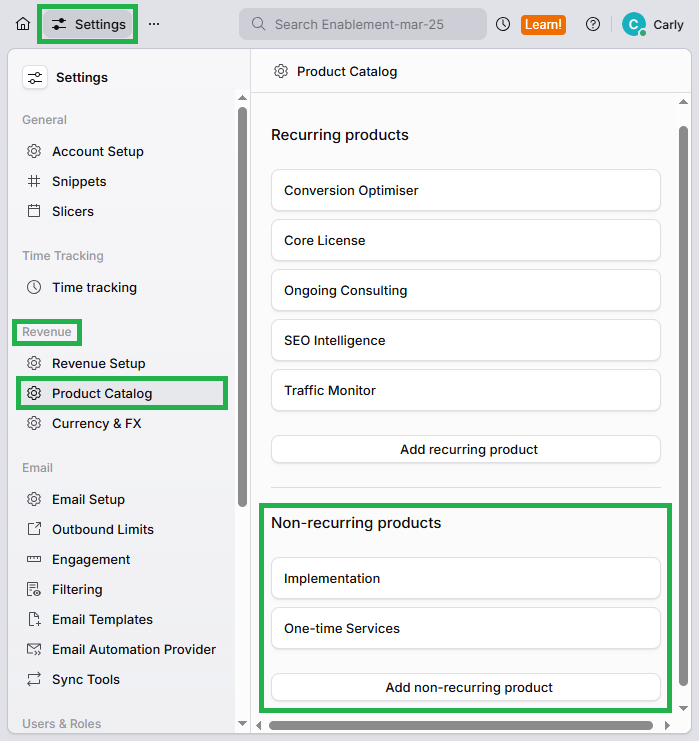
Click the image to view it enlarged
Once you have added your non-recurring products, they will appear as options in the "Product" field on the Sale model in Planhat.
How to add Sale (NRR) records
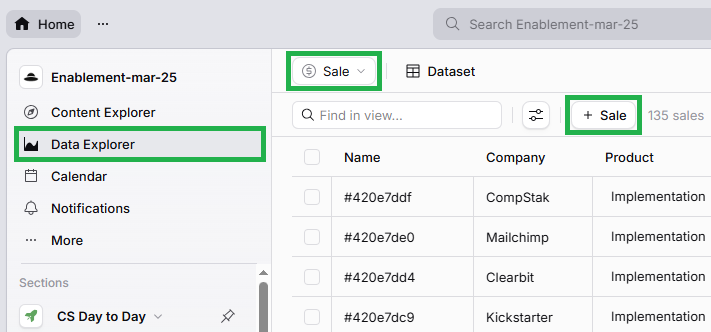
There's several different ways that you can add a Sale record in Planhat, as described below. (You can click the images to view them enlarged.)