Planhat OS - Memory
Memories are facts personal to you or your colleagues/organization that Pi uses in Sessions
Summary
Pi remembers durable, short facts and preferences across your Sessions
Memory has four levels: just you, your Team, everyone with your Role, and your whole organization
Memories are created conversationally, when chatting with Pi in Sessions. Ask Pi to remember something, or let it save a preference it infers from how you correct it
Who is this article for?
Planhat users on Planhat OS
Anyone else who would like to learn about Memory
Article contents
What is Memory in Planhat OS?
A "Memory" is a short, durable fact that Pi keeps across Sessions: a preference or a standing rule. When chatting with Pi in a Session, Pi assembles the Memories that apply to you and reads them before answering.
Memories and Skills
Memories hold facts, whereas Skills hold procedures. "My competitors" is a Memory; "here's how I run a renewal review, step by step" is a Skill. They work together: a Skill describes the process, Memory shapes additional context as to how it's carried out for you.
Memories are background context, not instructions. Pi treats them as internal notes. Memory can't grant access data you couldn't otherwise see, and can't override how Pi is configured to behave.
📚 Further reading
To learn more about Skills, check out our separate article here.
The four levels of Memory
Every Memory belongs to one level:
Level | Applies to | Typical use cases |
Personal | Just you | How you like answers presented; your own coverage arrangements |
Team | Everyone in that Team | A convention the Team follows; who covers what during a holiday period |
Role | Everyone holding that Role | Guidance for everyone with the same permission profile, e.g. all Support Specialists |
Organization | Everyone in your tenant | A company-wide rule, definition, or naming convention |
What Pi reads for you is the combination: every organization-wide Memory, Memories for each Team you're in, Memories for each Role you hold, and your own personal Memories.
🚀 Tip
When creating/saving Memories (see below), Pi defaults to the narrowest level that fits. If you express a preference, this defaults to become personal Memory unless it clearly applies to a whole group.
Why use Memory?
Cross-Session knowledge. Each Session contains only its own context. Memory carries over important facts across Sessions
It scales decision-making. An organization-wide Memory means every colleague benefits from the same definition - for example, custom nomenclature, or which metrics are valuable. This consistency is otherwise hard to achieve in a distributed organization
How to add a Memory
There are two routes:
(1) Ask directly. Tell Pi to remember something: "remember that I want summaries to lead with ARR", or "from now on, always include churned accounts in portfolio counts." Phrasing it as a standing rule - "always", "from now on", "remember this" - is what makes it a confirmed Memory rather than an inferred/unconfirmed one.
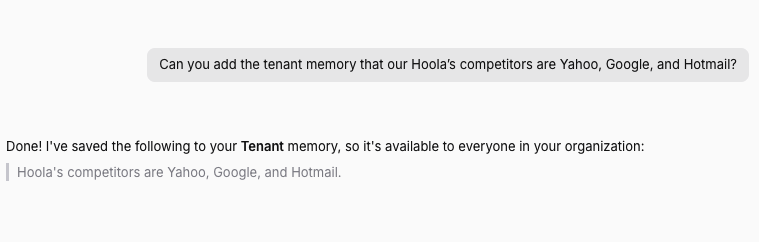
(2) Let Pi infer it. When you correct or redirect Pi, Pi treats that as a likely durable preference and saves it as unconfirmed. You don't have to ask explicitly for it to be saved.
Confirmed and unconfirmed Memories
Confirmed Memories are created when stated as a standing fact, or affirmed when asked. For example: "Always…", "from now on…", "remember this…", or agreeing with a Memory Pi read back to you.
Unconfirmed Memories are Pi's own inference from how you behaved. For example, a simple redirect, like "show ARR instead" implies a preference without stating one.
How to review what Pi remembers
Ask in a Session. "What do you remember about me?" returns everything that applies to you.
You can also ask for a subset - e.g. "What do you remember about how I like reports formatted?", or "What does Pi remember for my whole organization?"
As of now, there's no separate screen/menu to manage Memory.
How to correct or remove a Memory
To correct one, just say the new version: "Actually, lead with seat count, not ARR." Pi replaces the old Memory rather than adding a second, contradicting one.
To remove one, say "forget that", or name what should be dropped: "forget that I'm covering Hulk's accounts."
To go back to default behavior, ask - e.g. "just use my profile name", or "go back to normal." Pi deletes the Memory that overrode the default rather than saving a new Memory describing the default.
🚀 Tip
If you notice Pi acting on something out of date, correcting it - rather than creating a new Memory - is a better resolution to an improved response.
Rather than stacking more Memories, you should fix the existing one, so contradicting Memories don't build up.
Who can save Memories at each level
Level | Who can save |
Personal | You, for yourself only. Nobody can write to another User's personal Memory, not even an Admin |
Team | Managers of that Team, and Admins |
Role | Users of that Role only |
Organization | Admins only |
If you ask for something to be remembered organization-wide and you don't have the rights, Pi will tell you and offer to save it as a personal Memory instead.
📌 Important to note
Personal Memory is genuinely personal. There is no route, including for Admins, to write a Memory into another User's personal scope.
Limits and expiry
Each Memory is up to 500 characters. One fact per Memory
Memories can optionally carry an expiry date, set when you state one - e.g. "until the end of August". They're removed automatically when the expiry date passes
Memories without an expiry are kept until removed
There's a limit on how much Memory is read per message. If a lot has accumulated, Pi prioritises your personal Memories, then organization-wide, team, and Role
🚀 Tip
Because your personal Memories are read first, personal preferences always take effect. Broad Memories are the ones at risk of being crowded out - which is a reason to keep organization-wide Memory to genuinely universal facts.
Frequently asked questions (FAQs)
Q: How do I see what Pi remembers about me?
A: Ask Pi in a Session directly what it remembers about you
Q: Can I set a Memory that expires?
A: Yes - you'll need to state the expiration date, otherwise there is none
Q: How long can a Memory be?
A: Up to 500 characters