Planhat OS - Topics
Topics - a new data model in Planhat OS, for grouping Sessions based on themes
Summary
"Topic" is a Planhat data model that groups related Sessions in one place, much like a channel in Slack
Use a Topic to collect posts on one subject - e.g. product updates, or closed deals - so the conversation lives in Planhat instead of a chat app
A Topic record's Profile is a live feed of Sessions, and you post to it straight from the composer at the bottom
You control who sees a Topic with "Public" and "Private" options, and you can add whole Teams at once
Who is this article for?
It's particularly relevant for teams who want to move everyday work discussion - e.g. wins, release notes, or feedback - into Planhat
It's also relevant to Planhat Admins who decide who can create and manage Topics
Article contents
Introduction
"Topic" is a native Planhat data model, specific to Planhat OS. You use Topics to group Sessions under one subject, so a stream of posts on that subject lives together in one feed.
Teams run a lot of their day in channels - e.g. a channel for closed deals, one for release notes, and another for inbound questions about a specific topic such as a particular feature. Each channel is really a subject with a stream of posts under it, and people drop in to read the feed or add to it. Topics bring that collaboration into Planhat.
For example, let's say you have a Topic called "Wins". When Marcus, an Account Executive, closes a renewal with mid-market customer Bridgewell Retail, he posts it to the "Wins" Topic. Becky, a CSM who follows the Topic, sees the new post, opens it, and replies with a message to congratulate him - all inside Planhat.
📌 Definitions
"Data model" or "model" - how data is organized in Planhat; similar to the "objects" you may be familiar with from other software. An example of a model is Company, which is used for organizations that are your customers or prospects
"Record" - a piece of data within a model. For example, for the Company model, records could be "Apple", "Lenovo", "GitHub" or "OpenAI" etc.
"Tenant" - your organization's copy of Planhat, where you and your colleagues work
"Session" - where you chat with Pi (Planhat's AI Agent) and/or your colleagues
📚 Further reading
To learn more about Sessions, check out our separate article here.
What are Topics?
"Topics" are how you can group together Sessions that are related to each other by a theme, rather than being related to another existing record in Planhat such as a Company.
In our main Sessions article, we describe how you can link Sessions to specific records in Planhat - e.g. you may have a customer Company "Experian", and then link all your Sessions about Experian to the Experian record. But what if you want to group multiple discussions about something that isn't already represented by a record in your Planhat tenant, such as "product updates" or "commercial team changes"?
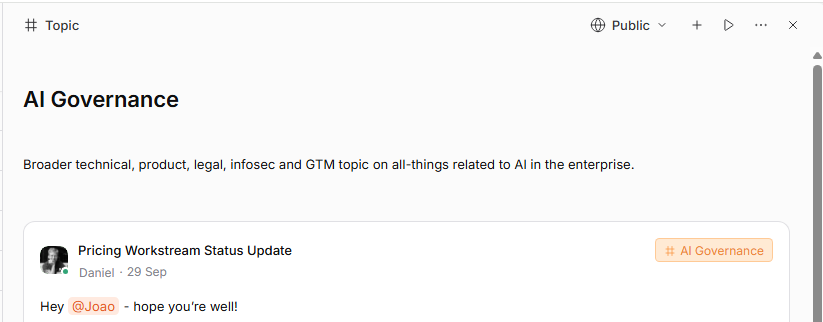
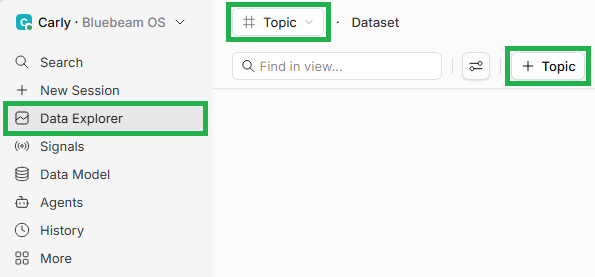
Topics are the answer to that. "Topic" is a new (released in 2026) data model launched specifically for Planhat OS. You can create Topics (i.e. Topic records) and then link Sessions to the relevant Topic. Topic records display in a specially designed Profile format: as a feed for your associated Sessions.
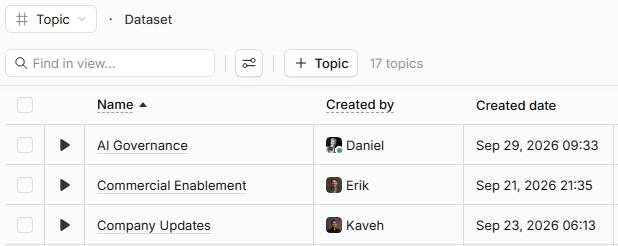
The screenshot below shows some example Topics (i.e. Topic records), listed when the Topic model is selected in Data Explorer.
📌 Important to note
At this time, a Session can only have one parent. If a Session is linked to a Topic, it cannot also be linked to a Company or any other model's record, and a Session already linked to a Company cannot later join a Topic.
Why use Topics?
Topics are for Sessions organized by subject (e.g. marketing announcements) rather than by another record (such as a customer Company). A Topic is the right home for an ongoing stream many people read - such as release notes, or a feedback channel - where a typical record (e.g. a Company) would be the wrong place.
For example, let's say a Product team creates a "Product Updates" Topic and posts each release to it. Anyone in the Planhat tenant can follow the feed, so the history of product updates stays in Planhat alongside its context.
How to set up and use Topics
🚀 Tip
You can subscribe to Sessions on other record Profiles too, such as a Company, from the same "..." menu.
Topics settings and access
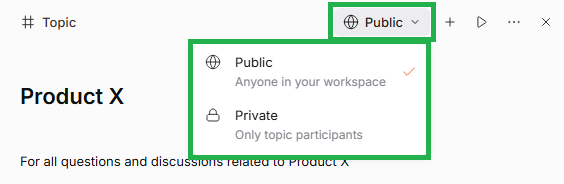
You control who can see a Topic and its Sessions from the Topic Profile header.
"Public" - anyone in your tenant can find and read the Topic and every Session in it
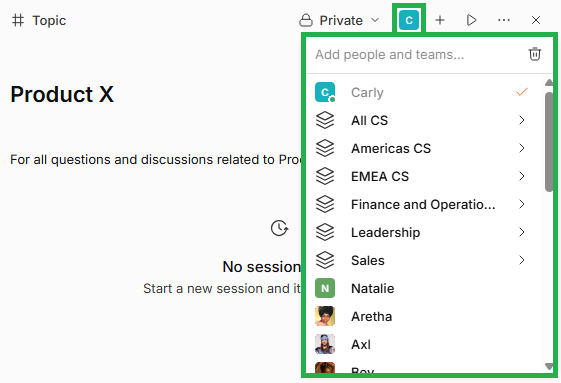
"Private" - only participants can see the Topic and its Sessions. You add specific participants
For a Private Topic, you can add participants two ways:
📌 Important to note
Access to managing Topic membership follows the "Topic" data model permissions in Roles.
Which Roles can create, view, update, or remove Topics is set by you as a Planhat Admin, the same way as for other models.
Frequently asked questions (FAQs)
Q: What is a Topic in Planhat?
A: "Topic" is a Planhat data model. Each Topic record is used for grouping related Sessions under one subject, like a channel in a chat app. Each Topic is a live feed of posts
Q: Can a Session be in a Topic and on a Company at the same time?
A: No. A Session has one parent. If it is in a Topic, it cannot also be on a Company, and vice versa
Q: Who can see a Topic?
A: A Public Topic is readable by anyone in your tenant. A Private Topic is readable only by its participants, including everyone in any Teams added to it
Q: How do I always get notified about new posts in a Topic?
A: Open the "..." menu on the Topic Profile and choose "Subscribe". New Sessions then appear in your sidebar
Q: Are Topics available in pre-OS Planhat?
A: No - Topics are a Planhat OS feature